
test.con
Graphical Programming Software
Simple Graphical Programming Software for Edge Computing Devices
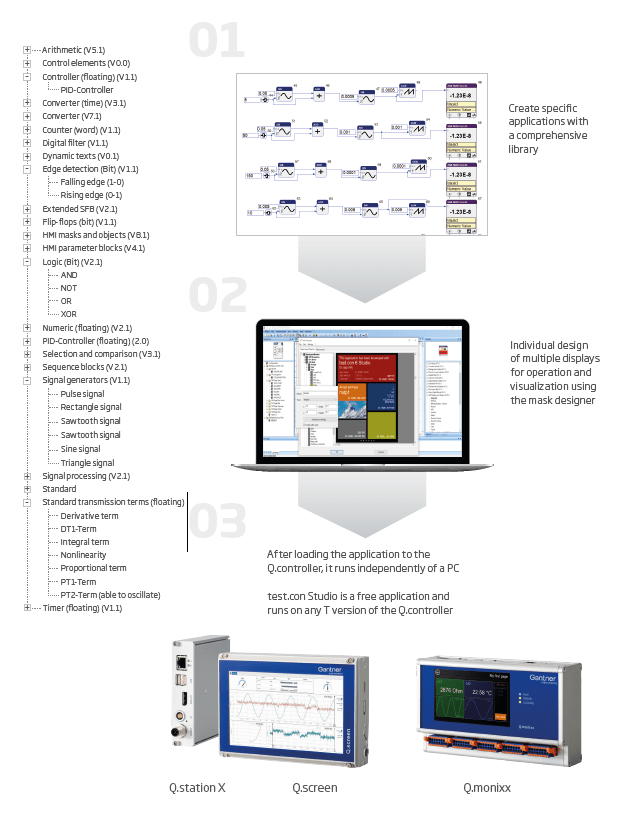
The complete measuring, signal conditioning, data management, control, visualization, and operation tool for your edge-computing controller. test.con Studio allows graphical programming of application-specific functionalities, which run on the edge in real time.
Utilizing test.con
test.con programs running on Gantner T-version controllers are often used in industrial applications such as factory automation, process control, and machine control. They can be used to control and monitor various types of equipment, including programmable logic controllers (PLCs), robots, drives, and other industrial devices. They can also be used for data acquisition, process visualization, and other higher-level applications.
Curve Generator
Test and simulate different signals (e.g. Type K, PT100, NTC) in real time
- Simulation signal setups, e.g. Voltage or Current output to control or test various applications
- Temperature transient simulation as real
- Thermocouple or RTD output
- Specific curve shapes can be be generated by
drag and drop - PID controller
Statistical and engineering calculations
Perform statistical and engineering calculations in real time on the module level as the data is being collected.
Power Quality Monitoring
- Real time calculation of active power, apparent power and power factor for sinus shaped signals
- Pre-calculations of rms values, efficiency can be done also in the DAQ Module.
- Effective DC and AC monitoring for converter testing
Flow control
Design and control your measurement and data logging automation system.
Designing HMI pages
Create your touch-screen HMI display and the control functions for the variables of the attached controller to create a very powerful data logging automation system that runs without the need for a tethered PC or additional software packages.
Create your touch-screen HMI display and variable control functions.
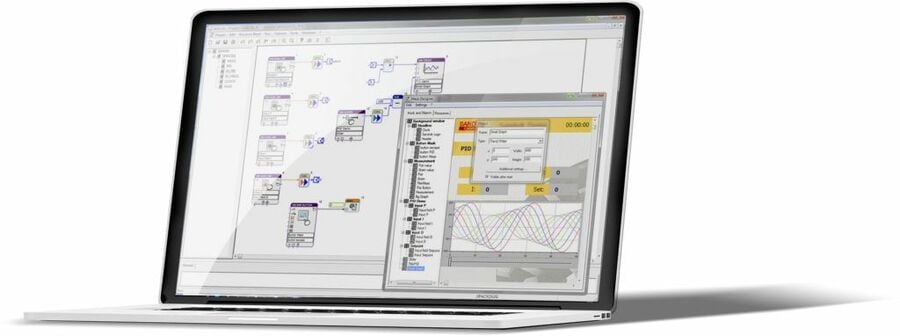
The integrated Mask Designer in test.con allows you to create your own touch-screen HMI for an external display (connected to a Q.station XT) or a network connected PC. By mapping the display and control functions for the variables of the attached controller, in a short time, one can create a very powerful data logging, automation and HMI display system that runs completely on the connected test controller — without the need for a tethered PC or any additional external software packages.
- Design PAC functionality
- Human-machine interfaces (HMIs) for Edge Devices
- Perform complex calculations
- Intuitive Graphical Programming
- Comprehensive library
- Free and Independent
Understanding PAC functionality for Q.series X
PAC stands for “Programmable Automation Controller,” and it is a type of industrial control system that combines the functionality of a programmable logic controller (PLC) and a personal computer (PC) into a single device.
As PAC devices, Gantner T-version controllers combine the ruggedness and reliability of a PLC with the flexibility and processing power of a PC. They have more memory and processing power than a traditional PLC and can support a wide range of applications.
PAC functionality converts DAQ hardware into a versatile and powerful system that can be used to control and monitor various types of industrial equipment, while also providing the flexibility and processing power needed for higher-level applications.
test.con Download
test.con Studio allows graphical programming of application-specific functionalities, which run on the edge in real time. Download now.
Extra functionality with test.con
test.con Studio is a free programming system which can be loaded on any number of computers. Licensing of software is not required. test.con Studio runs on all T-version controllers such as the Q.station XT. If you require the use of test.con, then you would need to use a Q.station XT controller. If you do NOT require test.con, then you would use the Q.station XB controller.
test.con is used to graphically program application-specific math functions, logic, and embedded HMI screens via your PC and then compiled and ran on the Q.station XT test controller. Programming in test.con is simple: drag the desired functions from an extensive library onto the worksheet and ‘wire’ the functions in the correct sequence – no code is required. Macros can also be created, consisting of multiple functions, to improve clarity, and simplify more complex routines.

Support for your test.con project?
Planning to use test.con in your automation project? Our experts provide tailored engineering services for the test.con Programmable Automation Controller (PAC). Get in touch with your nearest Gantner Instruments location.